Gemmart Design
  • 首頁
  • About me
  • ProjectsHot
  • BlogHot
    • 關於學習
    • 關於生活
    • 關於工作
  • Contact me
Category:

關於學習

Python

Python練習 #9-建立實體物件

by Gemma 2024 年 11 月 15 日
written by Gemma

本周目標

熟悉Python的基礎語法與資料結構

任務

  • 學習函數的定義和使用(Parameters、Return Values)
  • 練習設計和使用函數,並完成更多字串處理練習(例如文字查找和替換)
  • 學習file open, write, read指令
  • 學習json指令
  • 練習從公開網站讀取資料並寫入文件
  • 建立實體物件與實體屬性

專案練習

class Fullname:
    def __init__(self,x,y):
        self.x=x
        self.y=y

f1=Fullname("Will","Liu")
print(f1.x,f1.y)
f2=Fullname("Steve","Hung")
print(f2.x,f2.y)

Output

Will Liu
Steve Hung

2024 年 11 月 15 日 0 comments
0 FacebookTwitterPinterestEmail
Python

Python問題紀錄#8-公開資料抓取資料與清理資料

by Gemma 2024 年 11 月 14 日
written by Gemma

本周目標

熟悉Python的基礎語法與資料結構

任務

  • 學習函數的定義和使用(Parameters、Return Values)
  • 練習設計和使用函數,並完成更多字串處理練習(例如文字查找和替換)
  • 學習file open, write, read指令
  • 學習json指令
  • 練習從公開網站讀取資料並寫入文件

專案練習

載入台北市政府公開網站寫入內湖科技園區廠商資料

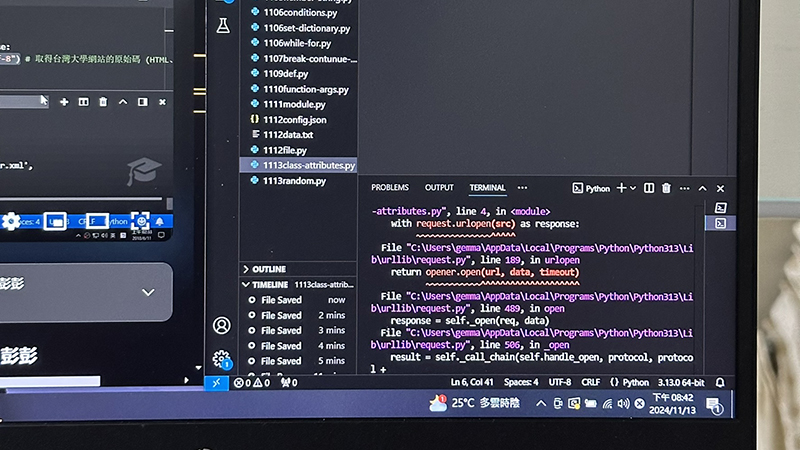
遇到問題”can only concatenate str (not “list”) to str”

 file.write(company["公司名稱"]+"\n"+["統編"]+"\n")
               ~~~~~~~~~~~~~~~~~~~~~~~~^~~~~~~~~
TypeError: can only concatenate str (not "list") to str

測試以下方法都有問題

file.write(company[str(統編:)+"統編"]+"\n")
SyntaxError: invalid syntax
file.write(company[str(統編)+"統編"]+"\n")
NameError: name '統編' is not defined
file.write(company[str["公司名稱:"]+[]"公司名稱"]+"\n")
SyntaxError: invalid syntax. Perhaps you forgot a comma?

發現語法company後面[“公司名稱”]才是正確語法

修正後程式碼

str(“公司名稱:”)=顯示在文件檔開頭的文字

company[“公司名稱”]=從網站抓取的資料

import urllib.request as request
import json
src="https://data.taipei/api/v1/dataset/296acfa2-5d93-4706-ad58-e83cc951863c?scope=resourceAquire"
with request.urlopen(src) as response:
    # data=response.read() #取得台中市政府公開資料原始碼
    data=json.load(response)
# print(data)
clist=data["result"]["results"]
# print(clist)
with open("1114data.txt","w",encoding="utf-8") as file:
    for company in clist:
        file.write(str("公司名稱:")+company["公司名稱"]+"\n"+str("統編:")+company["統編"]+"\n")

Output

公司名稱:藍色地平線股份有限公司
統編:00019996
公司名稱:詠富國際數位有限公司
統編:00023817
公司名稱:安大資本股份有限公司
統編:00034130
公司名稱:亞太空中移動股份有限公司
統編:00041907
公司名稱:無二電影有限公司
統編:00060538
公司名稱:達盈智能股份有限公司
統編:00073549
公司名稱:連迎國際諮詢服務有限公司
統編:00074266
公司名稱:仲和資產管理股份有限公司
統編:00075440
公司名稱:兆隆發展投資股份有限公司
統編:00083743
公司名稱:鏈捷數位科技有限公司
統編:00084546
公司名稱:斐意國際有限公司
統編:00085469
公司名稱:快組隊股份有限公司
統編:00093670
公司名稱:馗光食業股份有限公司
統編:00094875
公司名稱:詠擎科技股份有限公司
統編:00095348
公司名稱:台灣駿河屋股份有限公司
統編:00102116
公司名稱:旭夫特有限公司
統編:00125336
公司名稱:力運投資有限公司
統編:00130318
公司名稱:連豐國際投資股份有限公司
統編:00131528
公司名稱:金廣發展投資股份有限公司
統編:00142721
公司名稱:合作愉快有限公司
統編:00154253

2024 年 11 月 14 日 0 comments
0 FacebookTwitterPinterestEmail
Python

Python練習#7-載入json指令修改文件內容

by Gemma 2024 年 11 月 13 日
written by Gemma

本周目標

熟悉Python的基礎語法與資料結構

任務

  • 學習函數的定義和使用(Parameters、Return Values)
  • 練習設計和使用函數,並完成更多字串處理練習(例如文字查找和替換)
  • 學習file open, write, read指令
  • 學習json指令

專案練習

載入json檔案更新內容後重新回傳文字

import json
with open("1112config.json",mode="r") as file:
    data=json.load(file)
    # print(data)
data["name"]="Will"
data["version"]="2.3.7"
with open("1112config.json",mode="w") as file:
    data=json.dump(data,file)
with open("1112config.json",mode="r") as file:
    data=json.load(file)
print("Name:",data["name"])
print("Version:",data["version"])

Output

json原資料

{
    "name":"Steve",
    "version":"1.2.3"
}

程式回傳文字並更新

{"name": "Will", "version": "2.3.7"}

2024 年 11 月 13 日 0 comments
0 FacebookTwitterPinterestEmail
Python

Python練習#6-使用file指令做亂數與統計模組

by Gemma 2024 年 11 月 12 日
written by Gemma

本周目標

熟悉Python的基礎語法與資料結構

任務

  • 學習函數的定義和使用(Parameters、Return Values)
  • 練習設計和使用函數,並完成更多字串處理練習(例如文字查找和替換)
  • 學習file open, write, read指令

專案練習

寫入多行數字並計算多個數字總和

with open("1112data.txt",mode="w") as file:
    file.write("5\n6\n7\n8\n9")
sum=0
with open("1112data.txt",mode="r") as file:
    data=file.read()
    print("數字分別為:",data)
with open("1112data.txt",mode="r") as file:
    for line in file:
        sum+=int(line)
print("總和:",sum)

Output

數字分別為: 5
6
7
8
9
總和: 35

2024 年 11 月 12 日 0 comments
0 FacebookTwitterPinterestEmail
Python

Python練習#5-使用def和tuple計算平均值

by Gemma 2024 年 11 月 11 日
written by Gemma

本周目標

熟悉Python的基礎語法與資料結構

任務

  • 學習Python基礎語法(變數、數據類型、條件語句、迴圈)
  • 使用 if 條件控制和 for 迴圈來做簡單的數學計算
  • 深入學習列表(List)、字典(Dictionary)等資料結構
  • 學習使用break, continue和else
  • 學習使用def程式區塊與呼叫指令
  • def與tuple結合

專案練習

1. 計算平均值

def avg(*ns):
    sum=0
    for a in ns: #將數字從tuple列表抓出
        sum+=a #計算總和
    print(sum/len(ns)) #len算出列表長度(幾個數字或文字))

avg(1,2,3)
avg(10,27,30,25)
avg(15,15)
avg(1,2,3,4,5,6,7,8,9,10)

Output

2.0
23.0
15.0
5.5
2024 年 11 月 11 日 1 comment
0 FacebookTwitterPinterestEmail
Python

Python練習#4-使用def計算多組數字加總與平方根

by Gemma 2024 年 11 月 9 日
written by Gemma

本周目標

 熟練資料結構的應用,並完成一個簡單的文字處理專案

任務

  • 學習Python基礎語法(變數、數據類型、條件語句、迴圈)
  • 使用 if 條件控制和 for 迴圈來做簡單的數學計算
  • 深入學習列表(List)、字典(Dictionary)等資料結構
  • 學習使用break, continue和else
  • 學習使用def程式區塊與呼叫指令

專案練習

1. 計算多個數字種和

def caculate(b1,b2):
    sum=0
    for b in range(b1,b2+1):
        sum=sum+b
    print(sum)

caculate(0,10)
caculate(10,300)
caculate(25,30)
caculate(5,12)

Output

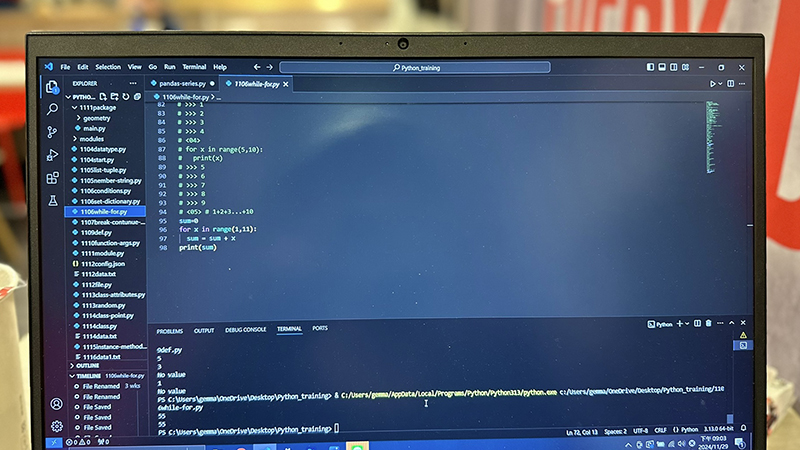
55
45105
165
68

2. 計算多組平方根

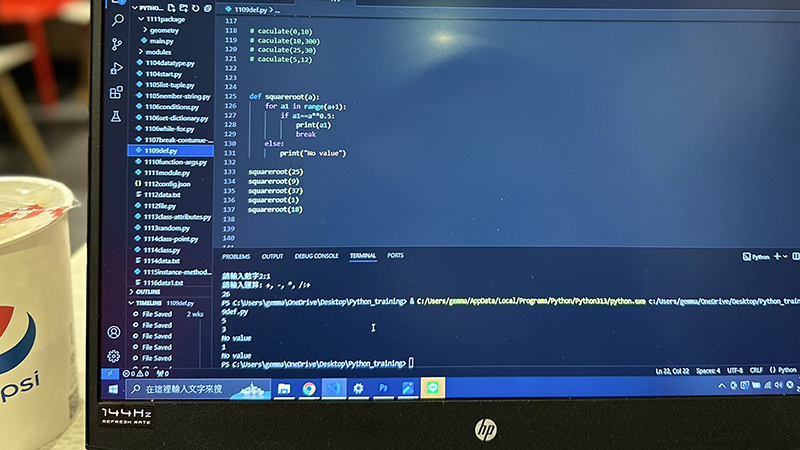
def squareroot(a):
    for a1 in range(a+1):
        if a1==a**0.5:
            print(a1)
            break
    else:
        print("No value")

squareroot(25)
squareroot(9)
squareroot(37)
squareroot(1)
squareroot(18)

Output

5
3
No value
1
No value

2024 年 11 月 9 日 0 comments
0 FacebookTwitterPinterestEmail
Python

Python練習#3-使用break, continue,else 計算平方根

by Gemma 2024 年 11 月 7 日
written by Gemma

本周目標

熟悉Python的基礎語法與資料結構

任務

  • 學習Python基礎語法(變數、數據類型、條件語句、迴圈)
  • 使用 if 條件控制和 for 迴圈來做簡單的數學計算
  • 深入學習列表(List)、字典(Dictionary)等資料結構
  • 學習使用break, continue和else

專案練習

進行平方根計算

第一種解法

n=int(input("輸入一個數字:"))
for i in range(n):
    if i*i==n:
        print("平方根=",i)
        break #break會直接停止 不會顯示後面else數值
else: #else在沒有平方根會提示使用者找不到平方根
    print("無平方根") 

Output

範例: 數字25,有平方根

輸入一個數字:25
平方根= 5

範例:數字77,沒有平方根

輸入一個數字:77
無平方根

第2種解法-使用continue

#程式有問題 輸入1會同時顯示平方根與找不到
a=int(input("數字:"))
b=0
for a1 in range(a):
    if a1==a**0.5:
        print(a1)
    else:
        b+=1
        continue
if b==a:
    print("can not find")
#有問題

Output

範例: 數字25,有平方根

數字:25
5

範例: 數字1,有平方根,但只會顯示”can not find”

數字:1
can not find

程式碼第4行從a改為a+1

#程式有問題 輸入1會同時顯示平方根與找不到
a=int(input("數字:"))
b=0
for a1 in range(a+1):
    if a1==a**0.5:
        print(a1)
    else:
        b+=1
        continue
if b==a:
    print("can not find")
#有問題

顯示平方根同時顯示”can not find”,一樣有問題

數字:1
1
can not find
2024 年 11 月 7 日 0 comments
0 FacebookTwitterPinterestEmail
Python

Python練習#2-for和while迴圈

by Gemma 2024 年 11 月 6 日
written by Gemma

本周目標

熟悉Python的基礎語法與資料結構

任務

  • 學習Python基礎語法(變數、數據類型、條件語句、迴圈)
  • 使用 if 條件控制和 for 迴圈來做簡單的數學計算
  • 深入學習列表(List)、字典(Dictionary)等資料結構

專案練習

使用for和while迴圈進行簡單的加總運算

while迴圈

n=1
sum=0
while n<=10:
    sum=sum+n
    n+=1
print(sum)

for 迴圈

sum=0
for n in range(11):
    sum=sum+n
print(sum)

Output

55
2024 年 11 月 6 日 0 comments
0 FacebookTwitterPinterestEmail
Python

Python練習#1-簡易計算器

by Gemma 2024 年 11 月 6 日
written by Gemma

本周目標

熟悉Python的基礎語法與資料結構

任務

  • 學習Python基礎語法(變數、數據類型、條件語句、迴圈)
  • 使用 if 條件控制和 for 迴圈來做簡單的數學計算
  • 深入學習列表(List)、字典(Dictionary)等資料結構

專案練習

可以進行基本四則運算的小計算器,幫助你熟悉條件語句和基本輸入輸出操作

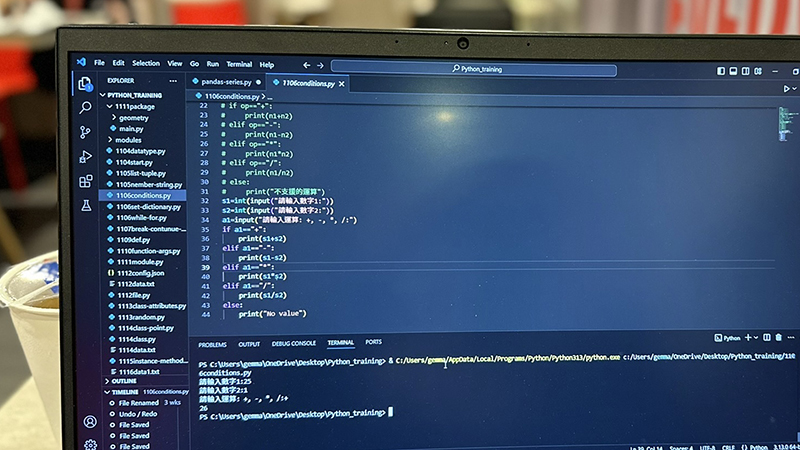
s1=int(input("請輸入數字1:"))
s2=int(input("請輸入數字2:"))
a1=input("請輸入運算: +, -, *, /:")
if a1=="+":
    print(s1+s2)
elif a1=="-":
    print(s1-s2)
elif a1=="*":
    print(s1*s2)
elif a1=="/":
    print(s1/s2)
else:
    print("No value")

Output

加法計算

請輸入數字1:20
請輸入數字2:10
請輸入運算: +, -, *, /:+
30

除法計算

請輸入數字1:30
請輸入數字2:3
請輸入運算: +, -, *, /:/
10.0

輸入錯誤

請輸入數字1:20 
請輸入數字2:80
請輸入運算: +, -, *, /:2
No value
2024 年 11 月 6 日 0 comments
0 FacebookTwitterPinterestEmail
Newer Posts
Older Posts

分類

  • 關於學習
    • Python
    • WordPress

近期文章

  • WordPress #1 – 網站建置資源

  • Python練習#18-Pandas基本功能

  • Python問題紀錄#17-網站上傳到Heroku無法正常運作

  • Python問題紀錄#16-下載Git後VS Code顯示無法辨識

  • Python問題紀錄#15-抓取AJAX網站資料 medium網站標題範例

  • Python問題紀錄#14-抓取KKDAY網站資料遇到SSI憑證問題

Instagram

About Me

About Me

Gemma Hung

Hi! 我是產品工程師,目前在一家美商手工具就職,歡迎來到我的個人部落格。這裡會分享關於我學習與熱愛生活的一切!我的人生座右銘很俗又無聊,「Play Hard! Work Hard!」,對我來說人生就像一場遊戲,每個階段都是在不斷打怪、練等級的過程,所以我把人生當成一場闖關遊戲,每個階段都認真享受得到果實的過程。

  • Facebook
  • Instagram
  • Linkedin
  • Email

@2024 - All Right Reserved. Designed and Developed by Gemma

Powered by
...
►
Necessary cookies enable essential site features like secure log-ins and consent preference adjustments. They do not store personal data.
None
►
Functional cookies support features like content sharing on social media, collecting feedback, and enabling third-party tools.
None
►
Analytical cookies track visitor interactions, providing insights on metrics like visitor count, bounce rate, and traffic sources.
None
►
Advertisement cookies deliver personalized ads based on your previous visits and analyze the effectiveness of ad campaigns.
None
►
Unclassified cookies are cookies that we are in the process of classifying, together with the providers of individual cookies.
None
Powered by
Gemmart Design
  • 首頁
  • About me
  • ProjectsHot
  • BlogHot
    • 關於學習
    • 關於生活
    • 關於工作
  • Contact me